Start free: A$10 of credit, no card. Make your first QR code →
AI event ticketing · Australia

Your whole event, built in minutes.

Skip the hours of setting up an event page, ticket types, wallet passes and a door list. Describe your event, or drop in your flyer, and DeStore’s AI builds all of it while you watch. Then it’s on sale.

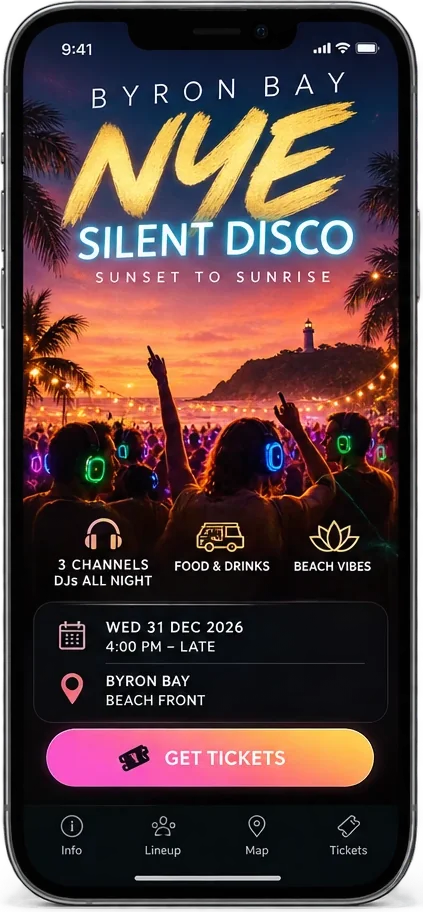
NYE silent disco, Main Beach Byron Bay, 31 Dec from 4pm. $40 tickets, $30 early bird.
  • Event page
  • Ticket types
  • Wallet passes
  • Flyer QR code
  • Door scanner
  • Google listing
A$0monthly fee
A$0booking fee on your crowd
1%only when you sell

A$10 of free credit to start. No card, no contract. Stripe’s or Square’s own card fees apply when you sell.

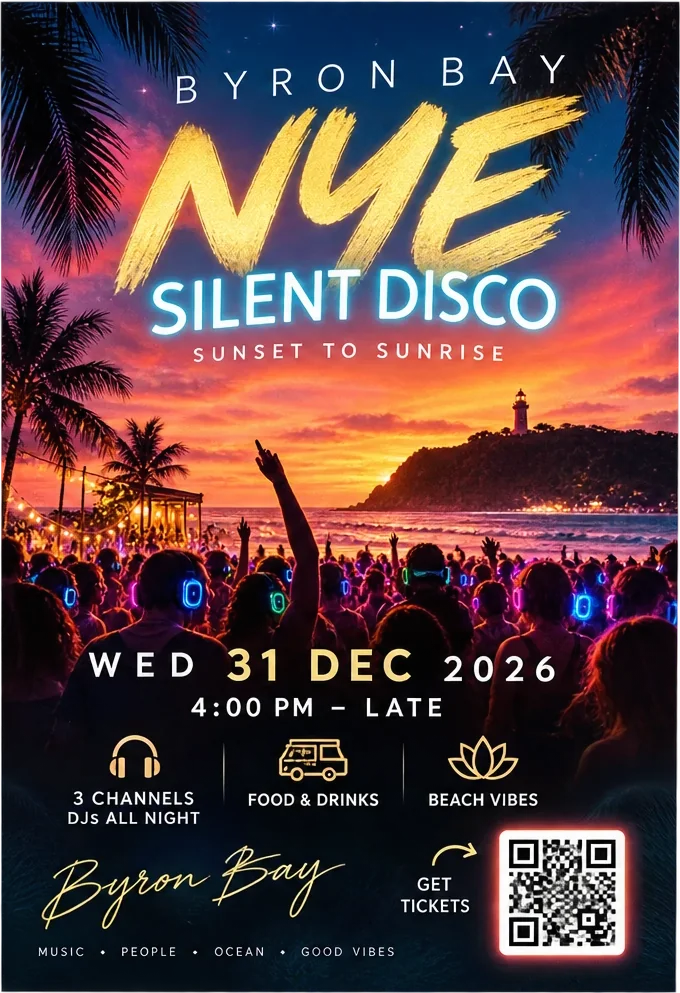
The event flyer with its QR code in place
The event page on a phone, with a Get tickets button
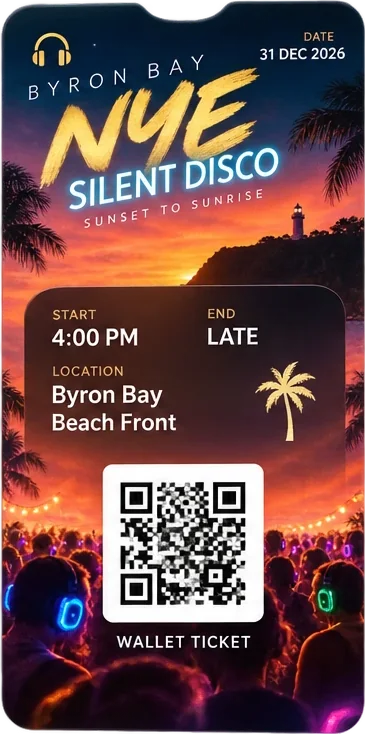
The wallet ticket with its own QR code

What is AI event ticketing?

AI event ticketing is describing an event in plain words and having the event page, ticket types, checkout and wallet tickets built for you, instead of filling in a ticketing site’s forms. In DeStore you tell the AI about your event, or hand it the flyer you already have, and it makes everything around the ticket for you.

Sell event tickets online in four steps

No ticketing forms to fill in, and no developer. Change anything later by asking.

01

Describe it

Name, date, place and prices, in your own words, or upload your flyer and the AI reads it. It builds the page in your logo and colours.

02

Set the tickets

Ticket types with how many there are, a normal price, an early bird price and an at-the-door price. Or make it a free event.

03

Connect and publish

Log in to Square or Stripe, or create a Stripe account. Publish, and the page checks every link before it goes live.

04

Scan them in

Open your door scanner on any phone. Each ticket gets in once, and the guest’s wallet pass changes to Checked in.

Everything an event needs, in one place

The event page

Your event on your own address, with its own QR code, built around your flyer and in your brand’s colours.

A fast checkout

A bright Buy tickets button, then Apple Pay, Google Pay or card. No app to download, no account for the buyer to make.

Wallet tickets

Every ticket saves to Apple Wallet or Google Wallet with its own QR code, and a reminder a week, a day and two hours before.

Your flyer, print-ready

Your flyer with its QR code placed in it, as a print PDF with bleed and crop marks, and a picture for social media.

The door

A scanner at your own address, with your logo, on any phone. A Ticket office pass hands it from one staff phone to the next.

Found on Google

List the event and it carries the event data Google reads. A Facebook kit gives you every detail ready to paste into a Facebook event.

A low ticketing fee, and no booking fee

Your buyers pay the price you set. Nothing is added at the checkout.

1%

of each sale to DeStore, plus Stripe’s or Square’s own card fees. 40c on a A$40 ticket.

A$0

booking fee for your buyers

35c

to publish the event page

99c

once for the page, hosted for 10 years

The money goes to your own Stripe or Square account and is paid out to your bank as usual; DeStore never holds it. Building with AI is charged by what it uses, from your credit. Every account starts with A$10 of credit, no card and no end date. See pricing →

What it does today, and what is next

Today

  • Up to 6 ticket types, each with how many, early bird and door prices
  • Sold out when they are gone, and the price of the moment on the page
  • Apple Pay, Google Pay and card through your own Stripe or Square
  • Apple Wallet and Google Wallet tickets, with reminders
  • A door scanner on any phone, each ticket in once
  • Free events, listed on Google or kept private
  • Made in DeStore, in ChatGPT or in Canva

Not yet

  • Reserved seating
  • Scanning at the door without a connection
  • Undoing a check-in
  • Selling at the door on a card reader

Questions organisers ask

How much does it cost to sell event tickets with DeStore?

DeStore takes 1% of each sale, plus Stripe’s or Square’s own card fees. On a A$40 ticket that is 40c to DeStore. Your buyers pay the price you set, with no booking fee added on top.

Publishing the event page is 35c, and 99c once hosts it for 10 years. Building it with AI is charged by what it uses, from your credit, and every new account starts with A$10 of credit and no card.

Can AI build an event page and sell tickets?

Yes. Tell DeStore’s AI the event’s name, date, place and prices, or upload the flyer you already have, and it builds the event page in your colours, sets the ticket types and puts the flyer’s QR code in place. Change anything by asking, then publish.

Once you connect Stripe or Square, the page sells. It can also be made from the DeStore Events app in ChatGPT or the Free QR app in Canva.

Can I sell early bird and door tickets?

Yes. Each ticket type has a normal price and how many there are, and can have an early bird price (until a date, or for the first so many) and an at-the-door price once the event starts. The page shows what each costs right now, how many are left, and Sold out when they are gone.

Can buyers pay with Apple Pay and Google Pay?

Yes. With Square, Apple Pay and Google Pay are one tap on DeStore’s own checkout, with card on Square’s secure page. With Stripe, Stripe’s checkout offers Apple Pay, Google Pay and card. There is no app to download and no account for the buyer to make.

Do I need a Stripe or Square account?

You need one of them to sell tickets, because the money goes straight to you and never through DeStore. Log in to the Square you already use, log in to Stripe, or create a Stripe account in a few minutes. Free events need neither.

How are tickets checked at the door?

Every ticket carries its own QR code, in Apple Wallet, Google Wallet or on the ticket page. Your door staff open your scanner on any phone (your own address, with your logo) and scan. Each ticket gets in once; a second scan says when it was used.

A Ticket office pass in the staff phone’s wallet opens the scanner, and the guest’s pass changes to Checked in.

Will my event show up on Google?

If you choose to list it, the live page carries the event data Google reads for its event listings (name, dates, place, ticket prices) and goes into DeStore’s events sitemap. Google decides what it shows and when. You can also keep an event private, for people with the link.

Can I make a free event?

Yes. A free event has no checkout: people see the details, add it to their calendar, and can save a free wallet pass if you switch it on. It costs only the 35c to publish and 99c to host.

Selling products rather than tickets? Direct commerce labels →
Put your next event on sale

Tell the AI about it, or upload the flyer you already have. Connect Stripe or Square, publish, and share the link.